 Connectdary
Digests
Get messages at once, a few times a day, or hourly. DMs and mentions still come through, and the sender sees when you’ll get theirs.

Every conversation in Connectdary has a topic, so nothing gets lost and nobody gets pinged for no reason. Bring in your clients and your AI agents too.
Free for up to 5 people. No credit card.

Features
Topics
In a channel, every conversation is a topic with a title. Open one, have the discussion, resolve it when it’s done. A new idea gets its own topic instead of drowning in a thread.
Mark a message as the decision, and the channel keeps a list of what was decided, so nobody has to scroll back three weeks to find out.

Markdown
Write real Markdown: headings, tables, and checklists you tick off right in the message, without it showing as edited.
Paste a Mermaid block and it’s drawn as a diagram, with the source one click away. Markdown files open formatted too.

Inbox
Needs reply, Mentions, FYI and Later. What needs you is at the top; the rest waits.
Snooze a message, set a reminder, or ask for a reply by Friday, and Connectdary brings it back at the right time.

Focus
Pause notifications for an hour or until tomorrow, and let only urgent messages through. Set yourself away and nobody gets a green dot that lies. Your phone stays quiet while you’re at your computer.
When you’re back, Home tells you what happened since you were last here, in one place.

Other companies
Share a channel with a client or a partner. They join with their own company and their own sign-in, and see only what you share. Or give a client a portal of their own.

AI agents
Add an agent the way you add a person: it gets a name, the channels you give it, and nothing more. Every action shows who did it. Connectdary speaks MCP, so the assistant you already use can read and write in Connectdary, with your permission.
Summaries, catch-up and translation are built in on Team and Business. Your messages never train a model.

Calm by design
Get messages at once, a few times a day, or hourly. DMs and mentions still come through, and the sender sees when you’ll get theirs.
If someone keeps marking things urgent outside your hours, Connectdary asks whether to keep letting them through. A noisy channel gets a nudge to Mentions only.
Save a resolved topic as an answer. When someone asks the same thing later, Connectdary points them to it.
Say who needs to answer and by when. If they don’t, it comes back to you with a one-tap nudge.
Schedule a call with an agenda, or skip it and turn each point into a question to answer in writing.
Privacy
Some things shouldn’t sit in a chat log or pass through anyone’s server in the clear.
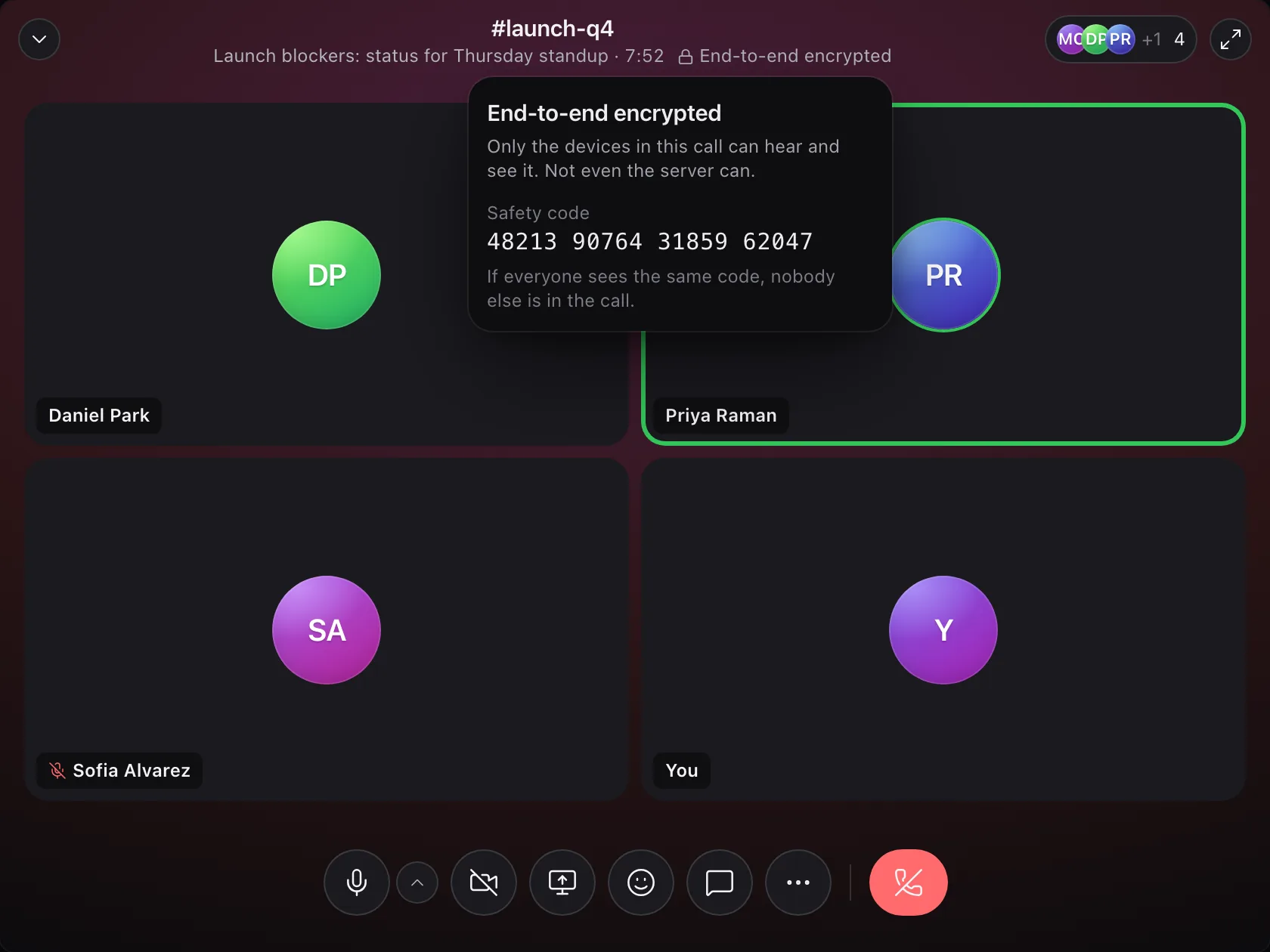
Turn on end-to-end encryption and a call’s keys stay on the devices in it. Every audio and video frame is encrypted before it leaves, so neither we nor our media provider can listen in.
Compare the safety code: if everyone sees the same one, nobody else is in the call.
Admins choose per workspace: off, encrypted, or end-to-end. Transcripts and recording stay off on end-to-end calls.
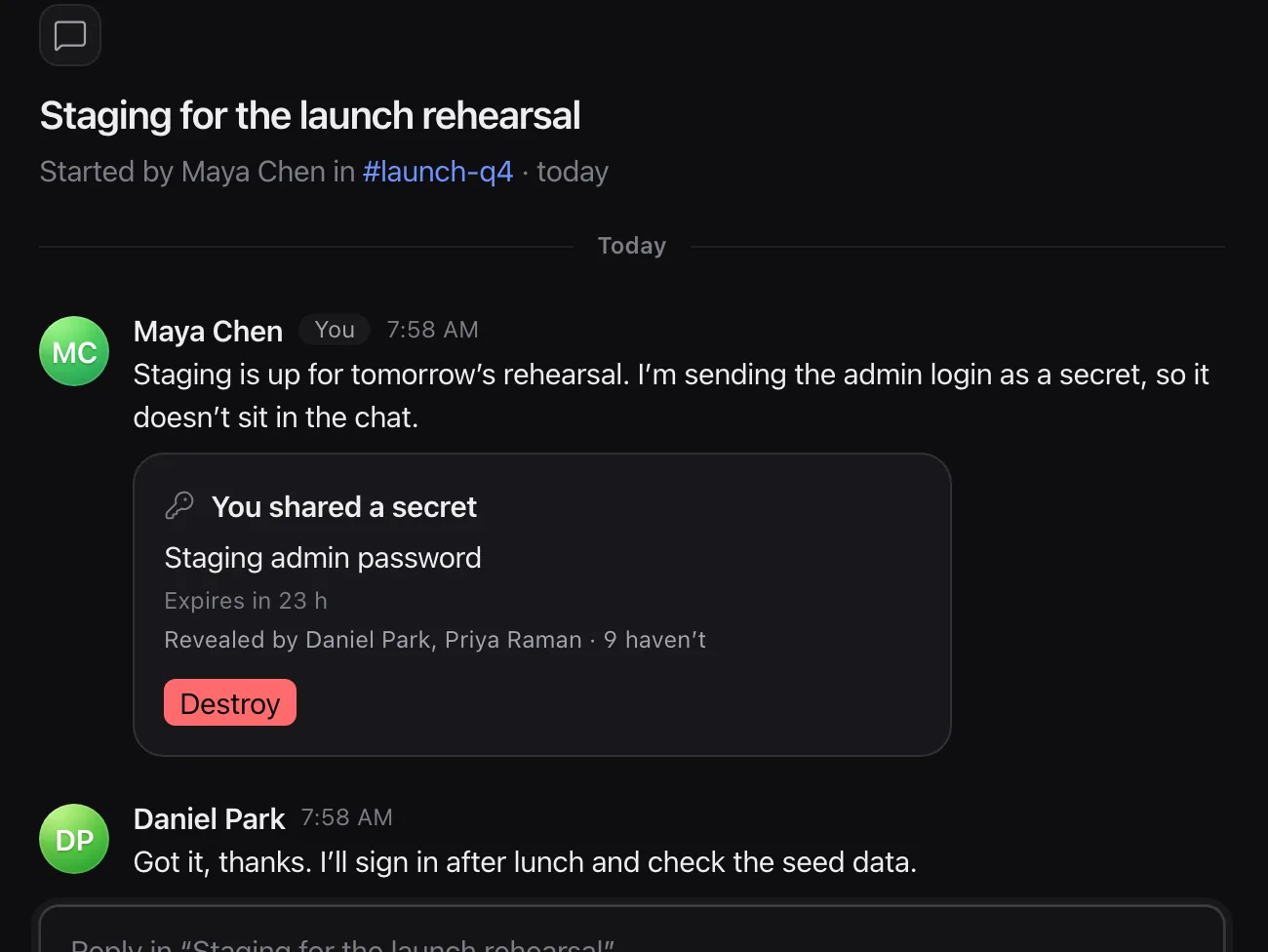
Send a secret instead of a message. Each person can reveal it once, it’s gone after an hour, a day or a week, and you see who has looked.
Destroy it early and it’s gone for everyone. Notifications, search and AI only ever see its label.
An app can’t both read DMs and send data to an outside address unless an admin allows it.
Every read is logged by conversation and time, and you can switch an app off.
AI has no database access of its own. It’s handed only what you may read.
Use OpenAI, Anthropic or any compatible provider (Business). If it fails, nothing goes to our AI instead.
The local cache is encrypted on your device, and messages written offline send once you’re back.
Error reports stay on our servers and are deleted after 30 days.
Developers
/api/v1, described in OpenAPI, so you can generate
a client in any language.
RateLimit-* headers.
await fetch("https://connect.example.com/api/v1/messages", {
  method: "POST",
  headers: {
    Authorization: `Bearer ${process.env.CONNECT_TOKEN}`,
    "Content-Type": "application/json",
  },
  body: JSON.stringify({
    conversation: "01M6476A9QYNM2R290GNH40HR3",
    topic_ref: "deploys",
    title: "Deploys",
    text: "Deploy finished",
  }),
});
curl -X POST https://connect.example.com/api/v1/messages \
-H "Authorization: Bearer $CONNECT_TOKEN" \
-H "Content-Type: application/json" \
-d '{
"conversation": "01M6476A9QYNM2R290GNH40HR3",
"topic_ref": "deploys",
"title": "Deploys",
"text": "Deploy finished"
}'And more

/ack a message and see who has acknowledged it, not just who was online.

Name the approvers and a deadline; everyone sees where it stands.

Single or multiple choice, anonymous if you like, live results.

Ask the team a question on a schedule, and post the summary.

A message in another language, in yours, in place.

The short version of a long message or file.

A summary of what you missed, with links to the messages.

Break through a pause only when it matters, and say why.

Write now, send at nine tomorrow, or at nine their time.

Say it instead of typing it.

Give a client their own calm page: what needs them, and what you share.

Turn a message into a task, assign it to a person or a team.

Move a conversation with its history, and see who gains or loses access first.

⌘K, ⌘J and the rest work as in Slack. s/teh/the fixes your last message.

High contrast and colour-blind-safe themes that follow you to every device.

New people get a start page with their channels, recent decisions and people to know.

After a call, its decisions and action items, ready to tick off.

Bring your channels and history with you.

Company sign-in and provisioning (Business).

Comment on a page of a PDF, and see every version of a file.

Answer from the lock screen, or move a call from laptop to phone mid-call.

Voice and video calls, a huddle in any channel.

A library for every channel, with previews.

Find messages by meaning, not just by words (Team and up).
Reply, acknowledge or approve without opening the app.
Your data
Your messages and files are yours to take, on every plan, and you can see where everything goes.
Import your channels, members and history when you arrive.
Anyone can export their own messages and files, whenever they want.
A privacy page in every workspace shows where data is stored and what each AI feature reads. AI can be turned off for the workspace or just for you.
Self-hosting is coming, with every Business feature. See the price.
Pricing
Per member, per month, billed yearly. Apps and bots are never billed.
€0 for up to 5 people
No credit card
€6 per member per month
Billed yearly
€12 per member per month
Billed yearly
€10 per member per month
Billed yearly, from 10 members
A topic is one conversation inside a channel, with a title. You open it, talk it through and resolve it when it’s done. A new idea gets its own topic instead of being buried in a thread.
Everyone who can sign in, including guests and people from other companies. Apps and bots never count.
Soon. Self-hosting is coming, with every Business feature on your own server; its price is under Pricing. It’s the same app: the desktop app switches between servers.
No. Your messages never train a model.
Yes. Import your channels and history when you arrive.
They can be. An admin turns on encryption for the workspace, either with keys on our servers or end-to-end, with keys that never leave the devices in the call. On an end-to-end call, nobody else, us included, can listen.
On Cloudflare’s network.